
Service
Contact
- Sales Manager:
136 9193 8340 Regional Managers (Southwest, South , East)
133 1685 3282 Regional Manager (Central China)
153 3876 1408 Regional Manager (Northwest)
134 1062 9251 Regional Manager (North China, Northeast)
- OEM:
134 1062 9251 Regional Manager
一. Controller Not Generating Power
Possible Causes and Troubleshooting:
1. Check whether the controller output voltage is within “42–60V”, and ensure that all wiring connections are correct.
2. Use a multimeter to measure whether the PV module input voltage is within “65–250VDC”, and ensure that the PV wiring is correctly connected.
3. Check whether the wiring terminals are properly tightened and ensure there are no loose connections or poor contacts.
4. Check whether the busbar voltage is lower than the equalization charging voltage.The busbar voltage “must be lower than the equalization charging voltage”.
5. Check whether the controller status indicator shows any alarm or fault.If an alarm occurs, troubleshoot and clear the alarm first.
6. Contact the manufacturer for further inspection and troubleshooting.
二. Display Screen Not Working / No Display
Possible Causes and Troubleshooting:
1. Try restarting the controller and check whether the display recovers.
Power-on sequence:
① Turn on the output circuit breaker first.
② Turn on the input circuit breaker afterward.
Power-off sequence:
① Turn off the input circuit breaker first.
② Turn off the output circuit breaker afterward.
2. Use a multimeter to check whether the input and output voltages are within the normal range.
3. Turn on only the output circuit breaker and check whether the display recovers.
4. Contact the manufacturer for further inspection and troubleshooting.
三. Monitoring Platform Offline / Unable to Connect
Possible Causes and Troubleshooting:
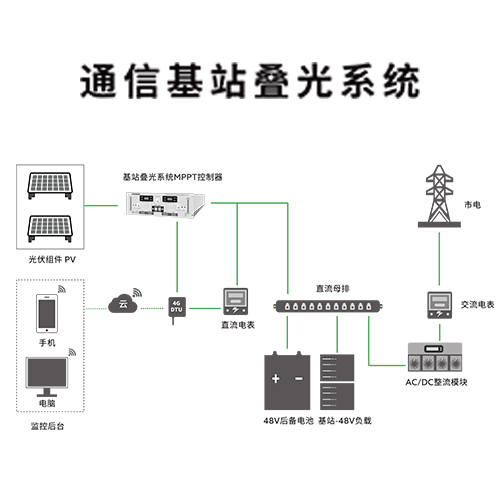
1. Check the gateway indicator lights and confirm whether the gateway status is normal.
2. Check whether the “A/B communication wires” on the gateway, electricity meter, and combiner box are loose or connected reversely.
3. Reinstall the SIM card and restart the gateway.
4. Check whether the SIM card is working properly.If the SIM card is expired, out of balance, or damaged, replace it and test again.
5. Check whether the antenna is properly connected.Verify that the local carrier network signal for the SIM card is strong enough.
6. Contact the manufacturer for further inspection and troubleshooting.
四. Abnormal Power Generation
Possible Causes and Troubleshooting:
1. Poor weather conditions or insufficient sunlight may result in low PV power generation.
2. Check whether the solar panels are shaded, dirty, or damaged.
3. Check whether the controller equalization charging voltage is approximately “1V higher than the busbar voltage”.
4. The telecom site load is relatively small, while the installed PV capacity is much larger than the load demand.The PV system has already fully replaced grid power and is supplying power to the load.
5. Contact the manufacturer for further inspection and troubleshooting.
五. Fault Codes
If the controller encounters a fault, check whether a fault code is displayed after each module number (no fault code will be displayed when the controller is operating normally).
The displayed fault code can be used for quick fault identification and troubleshooting.
Fault Code Description:

For example

Controller Module 1 is reporting fault code 000000100. According to the fault code description, this indicates a battery undervoltage alarm; therefore, we simply need to inspect the battery input.
一. IGBT Fault
1. It may be a false alarm. Restart the controller and check whether the alarm can be cleared.
2.Contact the manufacturer for repair.
二. Battery Overvoltage
1. Measure the output voltage and check whether it is higher than the controller equalization charging voltage.If it is higher, reduce the busbar voltage of the power cabinet or increase the equalization charging voltage of the controller.
2. If there is a significant difference between the measured output voltage and the voltage displayed on the screen, the sampling accuracy may be abnormal. Contact the manufacturer for repair.
三. PV Overvoltage
1. Measure the PV input voltage and check whether it exceeds the maximum input voltage of the controller.If it exceeds the limit, reduce the number of PV modules connected in series.
2. If there is a significant difference between the measured PV input voltage and the voltage displayed on the screen, the sampling accuracy may be abnormal. Contact the manufacturer for repair.
四. Charging Overcurrent
1. Check whether the maximum charging current value in the controller settings matches the rated maximum charging current of the controller model.If they do not match, modify the setting to the corresponding value.
2. Contact the manufacturer for repair.
五. Ambient Overtemperature
1. Install an air conditioner or apply other cooling methods to reduce the ambient temperature.
2. Reduce the number of PV modules to decrease the PV input power.
3. Contact the manufacturer for repair.
六. Heat Sink Overtemperature
1. Install an air conditioner or apply other cooling methods to reduce the ambient temperature.
2. Turn off the controller and restart it after the controller has cooled down.
3. Contact the manufacturer for repair.
七. Battery Undervoltage
1. Measure the output voltage.If the output voltage is low and consistent with the busbar voltage, check the voltage of the switching power supply cabinet.
2. Measure the output voltage.If the output voltage is significantly lower than the busbar voltage, check whether the fuse in the switching power supply cabinet is blown.
3. Contact the manufacturer for repair.
八. Battery Overvoltage (Hardware)
Contact the manufacturer for repair.
九. Command Shutdown
The controller has been shut down through a communication command.
Restore operation by sending a power-on command through the communication interface.
Prev:Total Solar Radiation and Annual Average Peak Sunshine Hours Across the Country
Next:Troubleshooting Common Issues with IPANDEE Combiner Box Adapters